Sunday, 28 February 2016

OCEJBCD -7.Developing Message-Driven Beans

OCEJBCD (SCBCD) - 1Z0-895 - Enterprise JavaBeans Developer Certification

7.1. Understand the short-comings of using session beans as messaging consumers

Using a session bean as consumer has the problem of blocking server resources, because it will be a synchronous process (instead of asynchronous processing with message-driven bean ).

Using session bean receive() method will block the thread indefinitely until the message becomes available :

Message m = consumer.receive()

How to handle the blocking synchronous problem with session bean? Using a timed synchronous receive.

A parameter can be used to indicate the time waiting the message to arrive:
Message m = consumer.receive(1); //time in milliseconds
Message m = consumer.receiveNoWait();

See an example of Writing the Clients for the Synchronous Receive.

7.2. Describe the properties and life cycle of message-driven beans


7.3. Create a JMS message-driven bean


To create a message-driven bean the bean class:
  • is annotated with @MessageDriven
    • @ActivationConfigProperty Settings(*):
      • Acknownledge_Mode
        • Auto-Acknownledge
        • Client-Acknownledge
        • Dups-ok-aknownledge
      • DestinationType
        • Queue
        • Topic
      • Subscription durability
        • Durable
        • Non-durable
      • ClientId
      • SusbscriptionName
      • MessageSelector 
      • AddressList
  • implements MessageListener inteface
  • overrides onMessage() method

(*)Example of @ActivationConfigProperty configuration:
@MessageDriven(mappedName = "jms/Topic", activationConfig =  {
    @ActivationConfigProperty(propertyName = "messageSelector",
            propertyValue = "NewsType = 'Sports' ")
    , @ActivationConfigProperty(propertyName = "subscriptionDurability",
            propertyValue = "Durable")
    , @ActivationConfigProperty(propertyName = "clientId",
            propertyValue = "MyID")
    , @ActivationConfigProperty(propertyName = "subscriptionName",
            propertyValue = "MySub")
    })

There is an example of a message-driven bean class at the last section of this post.

7.4. Create life cycle event handlers for a JMS message-driven bean

See this post : Configuring a JMS environment, to know how to configure a server and include jms resources as connection factory and destination

Once the connection factory and the destination(Queue or topic) have been created, we can use dependency injection to use them in our message beans
like:
  • Connection factory
@Resource(name="jms/MyConnectionFactory")
private QueueConnectionFactory connectionFactory;
  • Destination
@Resource(name="jms/MyQueue")

private Queue queue;

With the connectionFactory we can define the context to create the producer and the consumer.
  • Connection and Session
Connection con = connectionFactory.createConnection();
Session session = con.createSession(true,0);
  • MessageProducer
MessageProducer producer = session.createProducer(topic);
  • Message types(TextMessage, MapMessage, ObjectMessage and others).
TextMessage message = session.createTextMessage();


7.5. Configure a JMS message-driven bean

Here is an example of using a message-driven bean:

  • A client where the user request to send a message (with a jsp page and a servlet, in the same way as examples described in previous posts : calling a session bean from a servlet).
  • A session bean (stateless) that will define a producer that put the message in the JMS queue.
  • A message-driven bean that will consume the message from the queue.


Session bean:

Message bean:

When executing the application in our configured server:
Write a message in the textarea and submit the message.
In the log can be read the producer sending the message and the consumer receiving it:
producer sends the message...
consumer receives message...

OCEJBCD (SCBCD) - 1Z0-895 - Enterprise JavaBeans Developer Certification
Sunday, 14 February 2016

Configuring a JMS environment

In this post we will see how to create a JMS administered objects (connection factory and a destination) in a glassfish server.

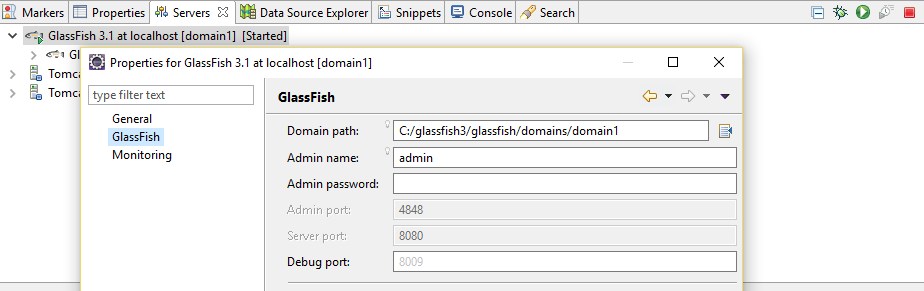
The server must be running.


We can see in properties that the admin port is 4848. So the administration console can be opened in a browser with the URL : http://localhost:4848


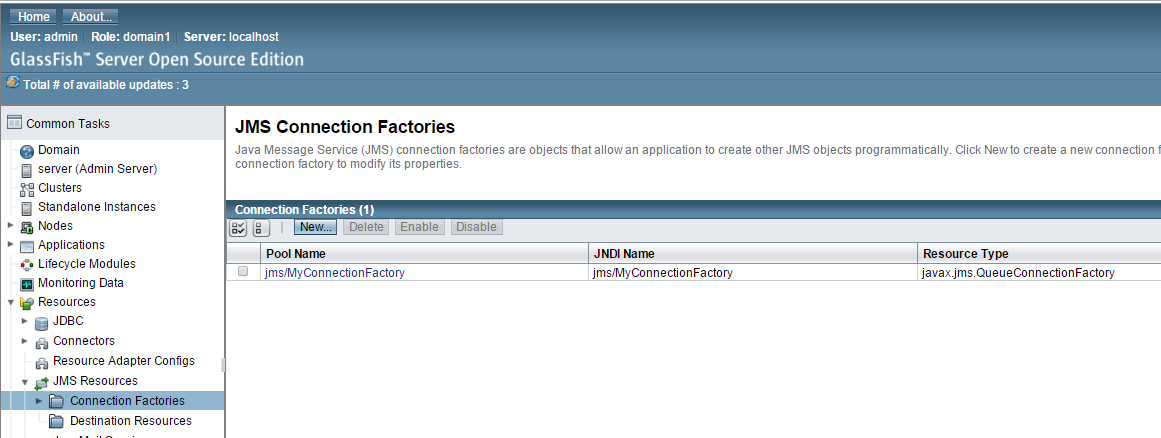
To start configuring JMS we need to define a connection factory

The connection factory interface is an administered object, used to create the connection with the JMS provider.


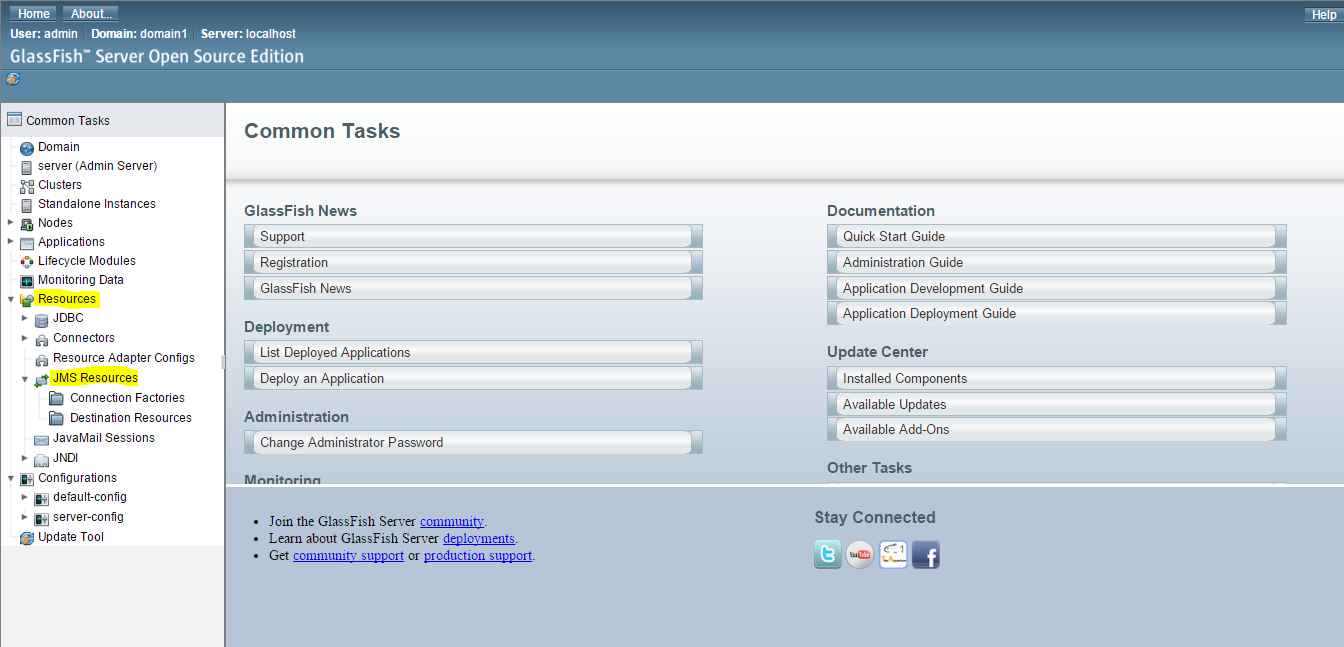
So, select Resources/JMSResource/ConnectionFactories/ New:


In this new window complete:
- PoolName
- ResourceType
- Description
- Check the enabled status
- The pool settings can be left as by default.

Click OK


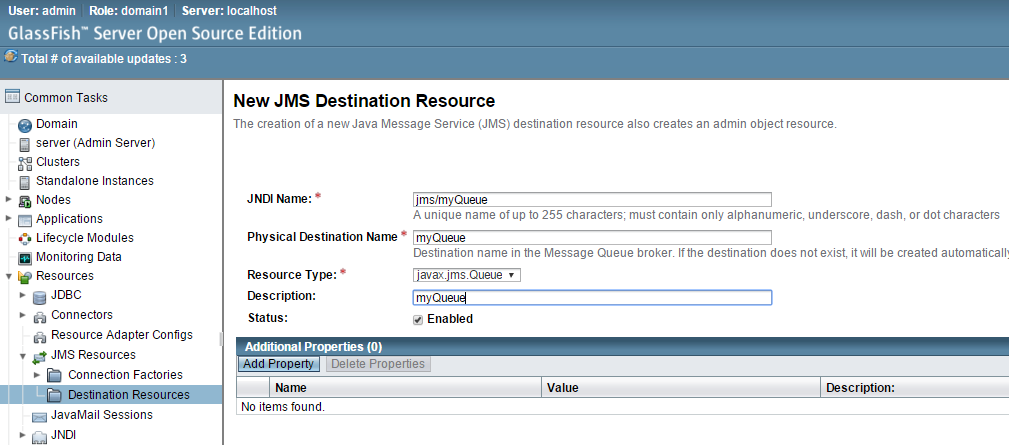
Now, that the connectionFactory has been created, it is necessary define a destination resource (it could be destination, queue or topic). In this example we will define a JMS point to point  so we will select queue:

Select Resources/JMSResource/DestinationResources/ New:


In this new window complete:
- JNDIName
- Physical Destination Name
- ResourceType : select javax.jms.Queue
- Check the enabled status
Click OK


Now JMS resources have been defined in the server, and we can use them to handle messaging in our application.

Saturday, 13 February 2016

Java Web Component Developer Certification OCEJWCD at a glance

OCEJWCD (SCWCD) - 1Z0-899 - Web Component Developer Certification

This post a is summary of info related Oracle JavaEE6 web component certification with all info available in this blog and other useful links:

Topics:


  • Exam:

    Further resources:

    • Books. I used HeadFirst Servlets & JSP (O'Reilly), but there are others like OCEJWCD Study Companion recommended in javaRanch.                    
    • Servlets 3.0 specification. You can download the JSR-000315 from here      
    • Java EE 6 API here                                                                                           
    • MockExams: 
      • Enthuware : there is trial version and full version.
      • Whizlabs : there is a free test and tests under purchase.


    Good luck!

    OCEJWCD (SCWCD) - 1Z0-899 - Web Component Developer Certification

    Friday, 5 February 2016

    Microservices

    Nowadays it is quite common to hear about the microservices architecture. What is the meaning behind the concept of microservices? Why is it changing the way of building software? I will try to summarize in this post the basic notions about microservices.

    A valid definition of Microservice can be the functionality that is deployable independently, for building a system in a modular way.

    Traditionally the projects in an organization are characterized by being monolithic. That means a project or group of projects with their dependences that are deployed as one entity. These projects share a database and are coded using the same language.


    On the other hand, microservices will have their own services and their own database. Also they do not need to use the same language, so the best technology can be used for each problem.

    Microservices architecture also solves a problem related with scalability. In a monolithic architecture as the project increases it needs more hardware resources (servers or containers).

    There is a very popular article about microservices in the Martin Fowler blog:
    Some main ideas about microservices:

    • Service oriented
    • Products instead of projects.
    • Smart endpoints and dump pipes communication pattern. Note :To know more about the meaning of this pattern you can read this explanation from stackoverflow. This pattern is the opposite to the use of enterprise service bus (ESB).
    • Microservices involves a team will be responsible of development, build, deployment, maintenance.
    • Decentralized data management: Microservices uses their own database. Managing distributed transactions can be a drawback, due to the need of synchronizing data.
    • Design for failure: it means that if one component fails it does not affect the others.
    • Infrastructure automation: Continous deployment, a change only requires deploying the microservice, not all the application as in monolithic architectures.

    Sunday, 31 January 2016

    OCEJBCD -6.Developing Java EE Applications Using Messaging

    OCEJBCD (SCBCD) - 1Z0-895 - Enterprise JavaBeans Developer Certification
    6.1. Review JMS technology

    JMS (Java Messaging Service) is an API to send/receive messages :

    1) Asynchronously:
    JMS works asynchronously because it sends messages to the client without a previous request, also it sends messages without having to wait for a reply.

    2) Loosely coupled: 
    Provides vendor-independent access to messaging systems.

    Messaging domain types:

    • Point to point :
      • Every message has a consumer
      • The messages are requested from the queue by the consumer.

    • Publish/Subscribe 
      • Every message has several consumers
      • The messages are pushed to the consumers without requesting.

      6.2. Describe the roles of the participants in the JMS API messaging system

    Components is a JMS system:
    • JMS Provider.- The messaging system
    • JMS Clients .- Any java component that is producer or consumer of messages
      • Producer
      • Consumer(Listener and selectors)
    • Messages .- the objects that contain the information.
    • Administered objects.- Destinations and connection factories.
    • Session.- single threaded context.
    • Connection.- connection with JMS provider.
    • Queue browsers.
    • Exception handling .


    6.3. Create a queue message producer
    MessageProducer producer = session.createProducer(queue);
    producer.send(message);
    See JMS message producer from the oracle java EE tutorial

    6.4. Create a synchronous message consumer
    MessageConsumer consumer = session.createConsumer(queue);
    connection.start();
    Message m = consumer.receive();
    See JMS message consumer from the oracle java EE tutorial

    The message can be consumed synchronously or asynchronously. 
    - synchronously : the consumer call the receive() method, that blocks until the message arrives
    - asynchronously : the consumer call the onMessage() message listener method.

    OCEJBCD (SCBCD) - 1Z0-895 - Enterprise JavaBeans Developer Certification
    Sunday, 24 January 2016

    Java 9 - The new things

    The new version Java9 is planned to be available next year.

    The main feature of Java9 is related with modularity (project Jigsaw). This feature is about having different modules for the JDK. This new feature will allow to install JDK in small devices (internet of things, cloud, mobile...), also will improve scalability and performance.


    Other new features that Java9 is likely to include are:

    • JSON API
    • HTTP2 API (WebSockets support)
    • JVM Optimization
    • Money and currency API

    This diagram represents how the language has been evolving from Java7:


    Monday, 18 January 2016

    OCEJBCD -5. Singleton Session Bean

    OCEJBCD (SCBCD) - 1Z0-895 - Enterprise JavaBeans Developer Certification

    5.1. Understand the advantages and disadvantages of using a singleton session bean

    A singleton is a stateless bean whose instance is accessed by all request in the application. Singletons have to be thread safe in order to manage the concurrently access.

    Advantages:
    - Only one instance. The bean will be created when the application is started and will exist during all application life.

    Disadvantages:
    - Could cause bottle-neck and performance, if it is not handle accurately.

    5.2. Create a singleton session bean
    javax.ejb.Singleton 
    @Singleton
    public class SingletonBean { ... }


    Other annotations that can be used with singleton are:


    @Startup (For eager initialization; it means the instance will be created at deployment time)
    
    
    @DependsOn (For adding dependencies)

    5.3. Describe the life cycle of a singleton session bean


    5.4. Implement singleton session bean life cycle methods

    For a full example using singleton see last section of this post.

    5.5. Describe singleton concurrency access

    Singleton beans are designed for concurrency access. There are two ways to manage concurrency.
    • Container-managed concurrency (by default)
    • Bean-managed concurrency
    Example:
    @ConcurrencyManagement(ConcurrencyManagementType.CONTAINER)
    @Singleton
    public class ExampleSingletonBean {...}

    For managing concurrrency, there are the following annotations to lock blocks of code:

    @Lock(LockType.READ)
    @Lock(LockType.WRITE)

    5.6. Implement a concurrency management strategy

    The following example describes the use of a singleton bean called by a servlet in order to get a random number in the page after clicking a button.

    The method that gets the random number can be accessed concurrently and the value will be consistent from different client accesses.

    Bean class:

    Servlet class:
    JSP:
    After running the application in the server, when the page is opened in a browser the first time:

    If we open another browser (emulating another client), the request accesses the same value of the counter. The counter value is going to be shared by all the requests:
    OCEJBCD (SCBCD) - 1Z0-895 - Enterprise JavaBeans Developer Certification