Sunday, 13 December 2015

OCEJBCD -4. Advanced Session Bean concepts

OCEJBCD (SCBCD) - 1Z0-895 - Enterprise JavaBeans Developer Certification
4.1. Understand the relationship between the EJB container and an EJB component.

EJB components:
  • Remote business interface. exposes business logic to remote clients. 
  • Local business interface. exposes business logic to local clients.
  • Local no-interface. exposes public methods of the bean without using interface.
  • Bean class.
* Note: message driven beans do not have remote or local interface.


EJB Container
Is the run-time container for beans deployed in the application server.
The container manages:
  • Bean life cycle
  • Persistence
  • Transaction
  • Security
  • Concurrency

4.2. Describe the life cycle for stateless and stateful session beans

Stateless life cycle

Stateful life cycle

Note: when there is a timeout or a system exception the bean will be back to does not exist state.

4.3. Implement session bean life cycle methods

import javax.annotation.PostConstruct
import javax.annotation.PreDestroy

@PostConstruct and @PreDestroy are callbacks when bean instances are created or destroyed.

import javax.ejb.PostActivate
import javax.ejb.PrePassivate

@PostActivate and @PrePassivate. To make the bean garbage collected in inactive periods, saving memory resources. The bean can be activated later and will maintain its conversational state.

4.4. Use a session bean to perform asynchronous communication

import javax.ejb.Asynchronous
@Asynchronous 

You can use asynchronous invocation on stateless session bean or singleton session beans.

The return type of the method annotated with Asynchronous can be void or java.util.concurrent.Future<V> (java/util/concurrent/Future.html)

Example of session asynchronous bean implementation:

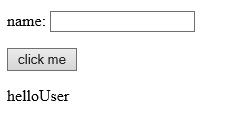
We need to define a stateless bean with an async method that is going to be invoked from a servlet. In the example we will have a page asking as for a user name and a button to submit. 

After submission our servlet will get the request parameter "username", and will call the async method of the bean using the username as argument.

The bean async method will receive the username, will wait 5 seconds and will return after that time a greeting message: Hello + username.

Bean code: 

Important:

  1. The bean is stateful session with an async method
  2. the async method returns a Future<T> object


Servlet code:

Important:

  1. servlet with a get method, and the bean is injected with annotation @EJB
  2. Observe that we will return the message back to the JSP when Future.isDone() that returns true when the task is completed.


JSP code:


The result when we executes the code above:
http://localhost:8080/TestWeb/helloPage


Remember:


  • TestWeb is the name of our web project(context)
  • helloPage is the name we have indicated in the annotation @WebServlet("/helloPage")


When the button is clicked after 5 seconds the greeting message is displayed in the page:

4.5. Have fine-grained control over packaging and deployment

Enterprise beans can be deployed using ejb-jar or war modules.

ejb-jar
  • root
    • classes
    • META-INF
      • ejb-jar.xml
      • manifest
WAR
In a WAR file we can include the classes under classes folder or include the JAR file under lib.
  • root
    • WEB-INF
      • ejb-jar.xml(optional)
      • classes (*)--> ejb classes included in this folder
      • lib
        • ejb-jar(*) --> JAR file


OCEJBCD (SCBCD) - 1Z0-895 - Enterprise JavaBeans Developer Certification

Tuesday, 24 November 2015

Configuring an EJB environment

This is a specific post to describe the steps to configure an environment in your IDE to create EJB applications, and deploy them successfully in a server.

In the example are used:
  • IDE - Eclipse Luna
  • Server - glassfish 3.1
  • JDK - Java 1.7

Create EJB project

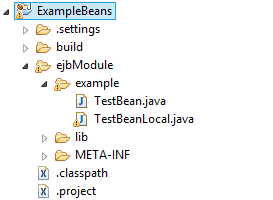
EJB project structure - example

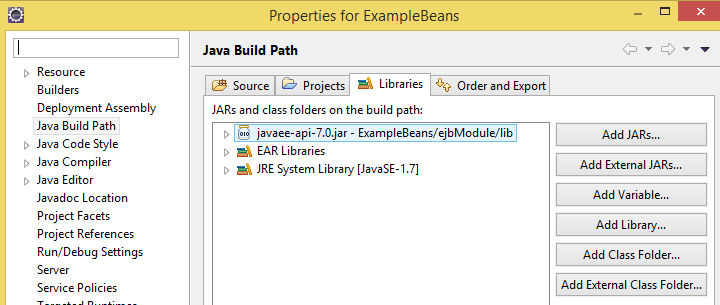
*Note: Take into account that the EJB 3.1 API needs to be added to the build path


The implementations details are in the previous post: http://javawithbreakfast.blogspot.com/2015/11/ocejbcd-3-accesing-session-beans.html

Create Web project


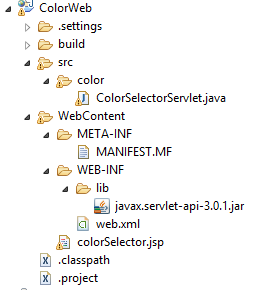
Web project structure:

*Note: Take into account that the servlet3.0 API needs to be added to the build path

Make the EJB project visible to the web project

Include the EJB project in the build path of the web project:
-Select web project, right button.
-Build path/Projects/ Add the EJB project


Important: to make the EJBs visible to the web project, the EJB project should be included in the deployment assembly:
- Select web project, right button. 
- Deployment assembly/ Add:  add EJB jar


Deployment
Deploy both projects in the server:


Saturday, 21 November 2015

OCEJBCD - 3- Accesing Session Beans

OCEJBCD (SCBCD) - 1Z0-895 - Enterprise JavaBeans Developer Certification
3.1. Understand the purpose and role of JNDI in relation to EJB components

JNDI : Java naming directory
Binding - assigning a name to an EJB object which can be used later.
Lookup - looking up and getting an object of EJB.


3.2. Configure JNDI environment properties

http://docs.oracle.com/javaee/6/tutorial/doc/gipjf.html#girgn

global
java:global[/application name]/module name/enterprise bean name[/interface name]
module
java:module/enterprise bean name/[interface name]
app
java:app[/module name]/enterprise bean name[/interface name]

3.3. Use JNDI to look up a resource

Accessing an enterprise bean can be done by dependency injection or JNDI lookup.

Example using JNDI lookup:
ExampleRemote example = (ExmapleRemote) InitialContext.lookup("java:global/myApp/ExampleRemote");

3.4. Write code that receives a resource reference through injection

The annotations for inject a resource are:
@EJB - used to inject other EJB reference (on fields or on methods).
@Resource - used to inject datasource or singleton services like sessionContext, timerService etc.

We will see a complete code example in the followings sections (3.5- 3.7) and step by step we will create a javaEE application. This simple application is compound by:
  • Web client project : with a servlet and JSP
  • EJB server project :with sessionEJB and its interface.

The purpose will be create an application that allows a user selecting one color from a dropdown list. When submitting the selection a servlet will be executed and will call an EJB bean method. The bean method will return the color that will be displayed in the screen.

3.5. Create a session bean client


We are going to define an stateless session bean with a method that will evaluate a number of options and it will return the hex code corresponding to one color:

If input is 1 -- > color blue
If input is 2 -- > color red
If input is 3 -- > color yellow


3.6. Create a session facade

http://www.oracle.com/technetwork/java/sessionfacade-141285.html

Session facade provides a level of abstraction between the client and the business object. It manages the interactions between client and business services.

For the session bean defined in the previous section we will define an interface, that will be used by the client to access to our bean.


3.7. Use dependency injection to locate an EJB


Now, we will have to define the client that will call the bean (Servlet and JSP).
JSP

Servlet class
The servlet class will have a method doGet, that will be called everytime the button submit is clicked.
The dependency injection to locate the bean is applied by annotation:
  @EJB
  TestBeanLocal colorBean;


After deploying our application (web and EJB) in the server. When entering this url in the browser: http://localhost:8080/ColorWeb/myColor, the page is open:

 When a color is selected the corresponding hex code and color are shown in the screen
Note: The details about environment configuration are described in this post : http://javawithbreakfast.blogspot.com/2015/11/configuring-ejb-environment.html
OCEJBCD (SCBCD) - 1Z0-895 - Enterprise JavaBeans Developer Certification
Sunday, 25 October 2015

OCEJBCD - 2- Implementing Session Beans

OCEJBCD (SCBCD) - 1Z0-895 - Enterprise JavaBeans Developer Certification

2.1. Examine session Beans

session bean encapsulates business logic that can be invoked programmatically by a client over local, remote, or web service client views. 

What is a session bean?

2.2. Identify the three types of session beans
  • Stateless
    • they can support multiple clients
    • does not mantain conversational state with the client.
  • Stateful
    • Mantains conversational state with the client.
    • Relationship 1:1 with client.
  • Singleton 
    • new in javaEE6
    • is instantiated once per application and exists for the lifecycle of the application (one per application).
    • A single enterprise bean needs to be accessed by multiple threads concurrently

2.3. Choose the correct session bean type given a business constraint

  • Session stateless - to implement a web service. Transaction-processing applications, which are executed using a procedure call.
  • Session stateful - GUI client (filling fields in a GUI needs conversational state)
  • Singleton- to implement web service endpoints

2.4. Create session beans package and deploy session beans
The javabeans configuration can be defined with annotations or using an xml deployment descriptor located in :
META-INF/ejb-jar.xml

OCEJBCD (SCBCD) - 1Z0-895 - Enterprise JavaBeans Developer Certification
Saturday, 17 October 2015

OCEJBCD - 1- Introduction to JavaEE

OCEJBCD (SCBCD) - 1Z0-895 - Enterprise JavaBeans Developer Certification

1.1. Gain an understanding of the Java Platform, Enterprise Edition(JavaEE)


An enterprise application provides business logic modules. It uses architectures of distributed layers and it is executed by an applications server.

The features of JavaEE in every version are defined by several specifications (JSR- Java specification request). 

1.2. Examine the JavaEE application architecture

Summary of JavaEE6 APIs:
    • EJB : Enterprise Java Beans Technology
    • Servlets
    • JSF : Java server faces
    • JSP : Java server pages
    • JSP Tag libraries
    • JPA: Java Persistence API
    • JTA: Java Transaction API
    • JAX-RS Java API for RESTful Web Services
    • Managed Beans
    • CDI JSR 299- Contexts and dependency injection for JavaEE
    • JSR 330- Dependency Injection for Java
    • Bean Validation
    • JMS : Java Message API
    • JavaEE Connector Architecture
    • Java Mail API
    • Java Authorization Contract for Containers
    • JASPIC Java Authentication Service Provider for Containers

1.3. Examine JavaEE container services

Types of containers in JavaEE:

  • Client side
    • Application Web Container
    • Applet Container
  • Server side (JavaEE Container)
    • Web Container
    • EJB Container

Popular web containers: Apache Tomcat, Jetty,..
Popular full JavaEE Containers: Jboss(WildFly), Weblogic, Glassfish, ...

Services provided by a full JavaEE container:


  • Security
  • Transaction management
  • JNDI (Java naming directory interface)
  • Java EE remote connectivity (RMI)
  • Manage servlet and bean lifecycle
  • Database connection and persistence
  • Access to JavaEE APIs.

1.4. Examine the EJB component types
  • Enterprise bean class
    • Session bean -- associated with a client. They can be stateless or stateful.
    • Message-driven bean - allows to receive messages asynchronously (JMS)
  • Business interfaces
  • Helper classes (utilities, exceptions..)

1.5. Evaluate the EJB Lite Container

A lightweight subset of Enterprise JavaBeans(EJB 3.1) functionality.
http://www.oracle.com/technetwork/articles/javaee/javaee6overview-part3-139660.html#ejblite
Features included in EJB lite:
  • Stateless, stateful, and singleton session beans
  • Local EJB interfaces or no interfaces
  • Interceptors
  • Container-managed and bean-managed transactions
  • Declarative and programmatic security
  • Embeddable API
OCEJBCD (SCBCD) - 1Z0-895 - Enterprise JavaBeans Developer Certification

Sunday, 27 September 2015

Producer Consumer Implementation - Blocking Queue

The Producer-Consumer design deals with the solution when different threads are involved in accessing the same shared resource to take or put elements from/to it.

- A consumer, thread class that removes one element from a resource.
- A producer, thread class that adds elements into a resource.
- A shared resource, called also monitor, will be a queue where the elements will be put and taken.

Originally this problem can be solved applying the methods wait() and notify(), and synchronizing the monitor.

The problem can be more simple using one of the collections of the concurrency package as blocking Queue (since 1.5).

BlockingQueue:
public interface BlockingQueue<E> extends Queue<E>

A Queue that additionally supports operations that wait for the queue to become non-empty when retrieving an element, and wait for space to become available in the queue when storing an element.
Definition from: 
http://docs.oracle.com/javase/7/docs/api/java/util/concurrent/BlockingQueue.html

This collection is part of java.util.concurrent package and its main feature is that provides internal locks and concurrency mechanism to be accessed atomically (thread-safe). The methods that can be used to implement the consumer-producer are: put / take.

Example:
Output:
Consumer takes0
Producer puts 0
Producer puts 1
Consumer takes1
Producer puts 2
Consumer takes2
Producer puts 3
Consumer takes3
Producer puts 4
Consumer takes4
Producer puts 5
Consumer takes5
Producer puts 6
Consumer takes6
Consumer takes7
Producer puts 7
Consumer takes8
Producer puts 8
Consumer takes9
Producer puts 9

Thursday, 10 September 2015

Java 7 - NIO - Watcher implementation

One of the new features of Java7 was NIO package. 
Java NIO also known as new input output library as is a set of classes defined under package java.nio.* to access files, file attributes and file systems.

The main classes from this package are:
  • Path - to manage file location and directory hierarchy
  • Files - to manage file operations
Some functionalities that can be implemented are:
  • Walking the file tree
  • Watchers - monitoring the creation/modification/deletion of files
  • Copy/Create/Delete files from a directory(atomic operations with synchronization)
  • Find files using matcher expressions
In the following example we are going to see how to implement a watcher. This is useful when we need a process to monitor when a file is created/modified or deleted in a directory.

Steps in this example:
1- watch for new files in a directory
2- evaluate the mime type of the file
3- if it is a text file it will be copied to other directory.